Review translations in Studio
Start Verbatra Studio, work the needs-review queue, fix entries in place, and retranslate flagged keys from the local dashboard.
Verbatra Studio is a local dashboard over your verbatra project: it shows every locale's state live, lets you fix translations by hand, and can retranslate single keys when you allow it. This guide walks the review workflow end to end.
The posture to keep in mind throughout: local editing is always on, gated only by the same integrity checks as every other write. Provider spend is never on by default; the retranslate and translate-pending actions exist only when you start Studio with --allow-spend.
Start Studio
Studio ships as its own package, reached through the CLI:
npm install --save-dev @verbatra/studio
verbatra studio
The command prints one line and keeps running:
Verbatra Studio running at http://127.0.0.1:5849/?token=...Open that URL, token included; the token is generated fresh per start and is how the browser authenticates. The server binds only to 127.0.0.1 (never your network), defaults to port 5849 with no fallback if it is busy, and takes --port to move. Stop it with Ctrl+C; a second interrupt forces it down with exit code 130. See verbatra studio for every flag.
The sidebar has four pages: Translations, Review, Activity, and Settings.
Read the Translations page
Translations is the working view: everything pending across your target locales, and how far along each locale is.
- The stat strip answers the first question at a glance: how many keys need attention, average coverage, how many locales are in sync, and the last run's token usage. When nothing is pending, an all-clear banner replaces the key explorer.
- The key explorer lists every missing, changed, and orphaned key, as a key-by-locale grid or as per-locale lists with a filter that matches a key's name or its translation text.
- The locales table shows per-locale coverage (missing, stale, up to date) merged with the lock file's state, so you can see whether each locale's lock entry agrees with its files.
Click any key to open its detail view: the per-locale values, each locale's sync status, and an integrity indicator per translation (placeholders match, placeholder mismatch with the missing and extra tokens named, or invalid message syntax). From there, Edit opens the editor for one locale's value.
Edit with integrity gating
The editor shows the source string and a text area pre-filled with the current translation. Saving submits the value through the same gate as every other verbatra write: a value that fails any of the integrity checks is rejected with the reason named and nothing is written. Clearing a translation is not one of the things an edit can express, so an empty value is refused too; the workbook's [[CLEAR]] sentinel is the supported way to unset a key. An accepted edit writes the locale file and advances the key's lock entry, exactly like an accepted import row.
Editing needs no flag. It touches only your local files and never calls a provider.
Work the Review queue
The Review page lists every entry the review heuristics flagged in the most recent translate or watch run: one row per locale and key, with an indicator per reason (translation far shorter or longer than the source, identical to the source, a missed glossary term, reordered placeholders, or a degraded provider batch). Until a run has been recorded, the page says so and stays empty; run verbatra translate or verbatra watch to populate it.
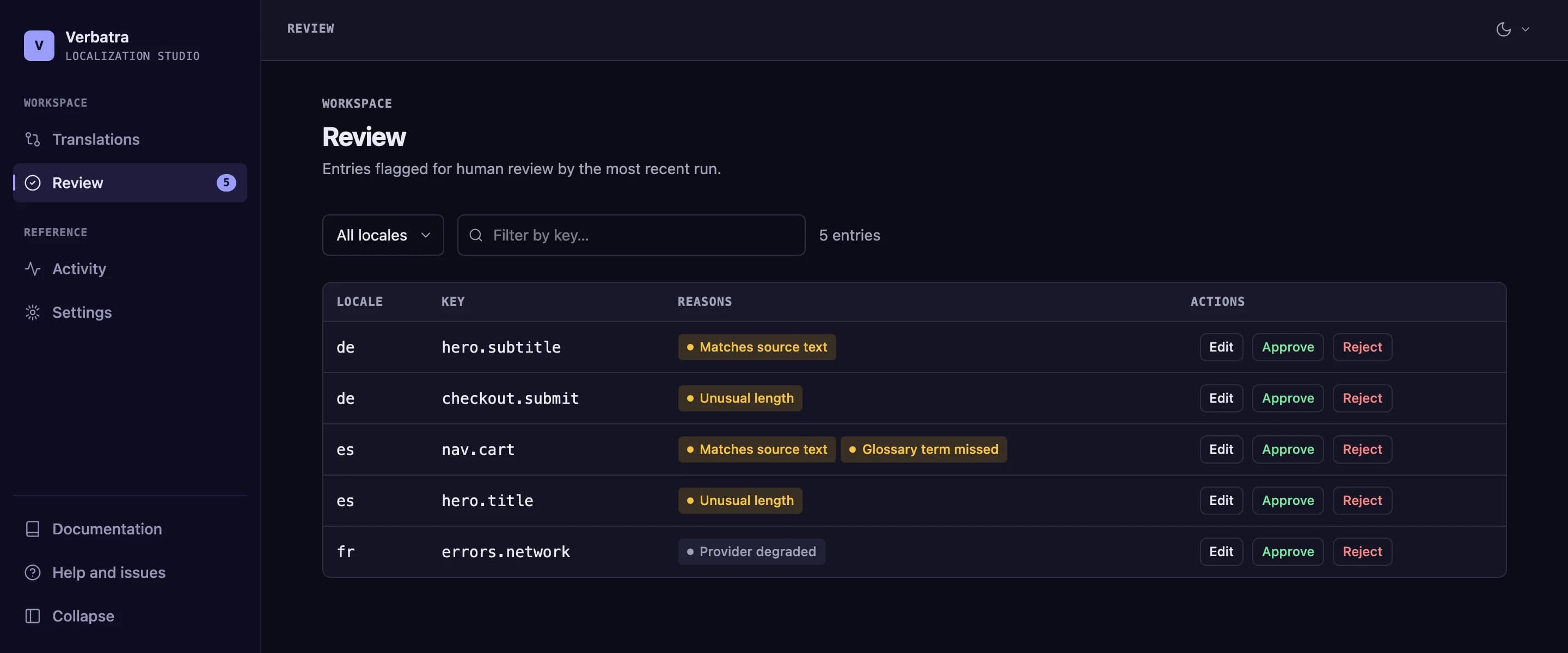
Available from @verbatra/studio 0.5.0
Filter by locale, or by a substring of a row's key, source text, or target text, then work the rows:
- Edit opens the same integrity-gated editor as the Translations page. An accepted edit clears the row from the queue.
- Approve dismisses the row as "looked at, fine as is".
- Reject dismisses the row too; pair it with an edit or a retranslate when the value actually needs to change.
Approve and Reject are session-only: they hide the row for the rest of this browser session (including across live refreshes) but write nothing to disk. The durable ways to clear a flag are fixing the value or re-running a translation.
Review flags are advisory, distinct from the hard integrity gate; see Translation safety for what each reason means.
Retranslate a flagged key
Start Studio with spend allowed:
verbatra studio --allow-spend(Or set VERBATRA_STUDIO_ALLOW_SPEND=1; the flag wins when both are given. The provider's API key comes from the environment as always, never from Studio.)
Now a key whose integrity indicator shows a real defect (a placeholder mismatch or invalid message syntax) gets a Retranslate button in its detail view on the Translations page. It makes one provider call for exactly that locale and key, runs the result through the integrity gate before anything reaches disk, and reports the outcome next to the button. The refreshed value then flows into the UI through the live-refresh loop.
Without --allow-spend, the button is absent entirely, and the server never even registers the retranslate endpoint: spend you did not grant at startup cannot be switched on from the browser.
Translate pending changes
Studio watches your source file, every target locale file, and the lock file while it runs. When one changes, every open page refreshes itself and a toast names what changed, with an added/changed/removed key delta.
When the source file changes and Studio runs with --allow-spend, that toast also offers Translate pending changes across all locales: a full translate run over everything currently pending, the same work verbatra translate would do. The button reports success, per-locale failures, or the error inline.
This live loop also means Studio pairs well with an editor session: change a source string, watch the toast appear, translate, and watch the grids go green without touching the terminal.
Check the damage on Activity
The Activity page puts two reference views side by side:
- Locale file history: the git commit feed for your source and target locale files (shown as unavailable when the project has no git history).
- Last run: the most recent run's input and output token counts and, when a token budget is configured, the budget meter and whether the ceiling was reached. This is a snapshot as of the last recorded run, timestamped, never a live counter; a provider that reports no usage (DeepL) is shown as "not reported" rather than a fabricated zero.
Keep the glossary current on Settings
Available from @verbatra/studio 0.4.0
Settings, the fourth page, shows the configuration this session was started with; restart Studio after changing the config file. The glossary next to it is different: it is read fresh from disk on every visit, and it is editable when the project keeps its glossary in a JSON file.
Each term then carries an Edit and a Remove action, and an Add a term form sits under the list. A change is written straight to that JSON file, one term at a time, and the panel shows the new state as soon as the write lands, with no reload. The rest of the file is left alone: key order and indentation survive, and the result is held to the same limits loadConfig enforces when it reads a glossary back, so an accepted edit is always re-readable.
Nothing here calls a provider or spends anything, so the actions are present with or without --allow-spend. What they do not do is retranslate: a glossary edit changes the terminology the next run is told to follow, never any text already written to a locale file. The glossary a running Studio hands to a provider call is still the one loaded at startup, so restart Studio for a fresh term to take effect on a retranslation from this session.
Two cases stay read-only, and the panel says which one you are in:
- The glossary is written inline in
verbatra.config.ts. That is executable code, and Studio will not rewrite it. Move the terms into a JSON file and point the config'sglossaryat that path. - The project has no glossary. Create a JSON file of term to translation pairs and set
glossaryto that path.
A value that looks like a provider API key is redacted before it ever reaches the browser, and such a term cannot be edited from here, only removed: what the panel holds is the placeholder, not the real text. Change that one in the glossary file itself.
Next
verbatra studio: every flag and the startup contract.- Operate Studio with a browser agent: drive this same workflow from a browser AI agent with
--expose-agent-tools. - Translation safety: the integrity gate and the review reasons.
- CI and exit codes: gate the same drift in CI that Studio shows you locally.